
The world map shows where you are. Press M to open it. Out in Gielinor it is the world map you know from 2012; in The Sanctum it shows the Sanctum's own painted map.
To travel, use the Travel window instead: T opens a map of your lodestones that you can click to go there. See Travel window.
In the Sanctum
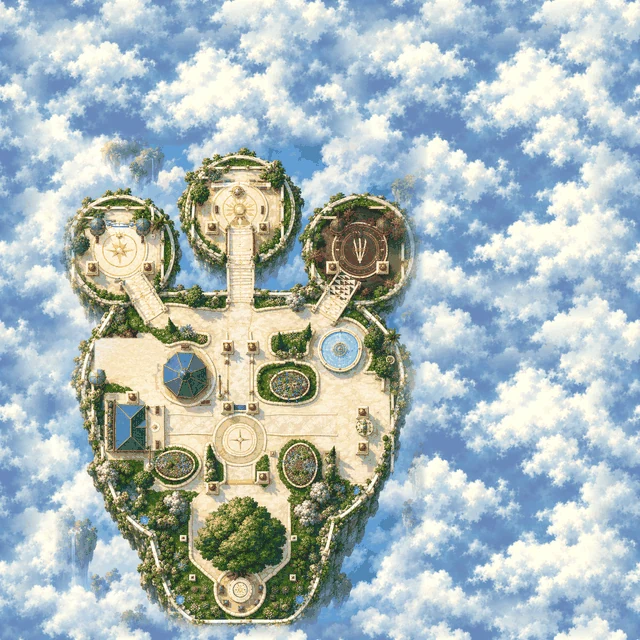
The Sanctum floats above the clouds, outside the map of Gielinor, so it has a map of its own. Open the world map in the Sanctum and you see the whole island from above, north up, with a you are here marker.
- Its icons are live: the bank, the Grand Exchange, the Gateway to Gielinor, the Pool of Renewal and the gods' shrines sit where they stand in the game.
- It opens zoomed in (200%), so the island fills the view.
Out in Gielinor
Everywhere else the world map works as it did in 2012. See the world map on the RuneScape Wiki.
Your gravestone
After a death, your gravestone gets a marker on the world map and a hint arrow over it, so you can find your way back to your items. See Death and gravestones.
Map, Travel window or minimap?
| You want to | Use |
|---|---|
| See where you are | The world map, M |
| Travel to a lodestone | The Travel window, T |
| Go home | The Home button by the minimap |
| Find your gravestone | The world map marker, or Travel near it on the death card |
See also
- Lodestones and the Travel window
- Travel
- The Sanctum
- Game screen, for the minimap
What links here (28)
- Area loot
- Bank
- Chat
- Codex menu
- Collection log
- Combat hotbar
- Controls
- Death and gravestones
- Game screen
- Game Settings
- Grand Exchange
- Keybinds
- Lodestones
- Money pouch
- Name plates and hitsplats
- Patch notes
- Player market
- Players-only items
- Price checker
- Quest helper
- Reporting bugs and players
- Sanctum portals
- The Sanctum
- Tool belt
- Training yard
- Travel
- View stats
- Wilderness