
View stats shows another player's levels and the gear they are wearing. Right-click a player and pick View stats. It came in update 2.1.15.
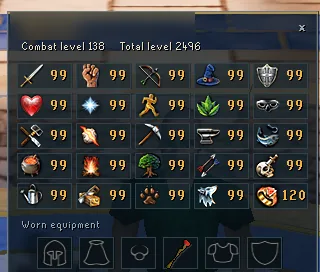
What it shows
- The player's name, combat level and total level.
- All 25 skill levels in a 5 by 5 grid, in the same order as your own Stats panel.
- The gear they wear, all 12 worn slots. Empty slots show the usual outline.
How to use it
- Be close: the other player must be on the same floor and within 16 tiles, or you read "<name> is too far away."
- Close other windows first: "Close the window you have open first."
- Holding a snowball or the Eggsterminator? Its own option takes that spot in the menu. View stats comes back when you unwield it.
Keeping your stats private
Game Settings > Privacy > Let others view my stats is on by default, so anyone near you can look. Turn it off and players who try read "<name> keeps their stats private."
Where it doesn't work
View stats is hidden in places where seeing someone's levels would give an edge. You read "You can't view other players' stats here.", or "You can't view <name>'s stats right now." when it's the other player who is somewhere it doesn't work:
- The Wilderness and other PvP areas, duels and the Duel Arena
- Community events, including watching one
- Clan Wars free-for-all, the Crucible
- Castle Wars, Stealing Creation, Soul Wars, Fist of Guthix and the Fight Pits, in the games and their lobbies