
The quest helper is the set of quest windows New School 99 added in update 2.1.12: the Quests panel that lists every quest, a window for each quest with its current step, and the pinned quest tracker at the top left of your screen that keeps your next step in view while you play.
Press Q or pick Quests in the Codex menu to open the panel. Click a quest for its window, and pin it to follow it on screen.
The Quests panel
The panel lists every quest in the game, playable or not. At the top it shows your quest points, a search box and a filter. Under them:
- Recommended next: three quests you can start now, each with a reason (see below).
- Every other quest, grouped by status (in progress, available by difficulty, and so on), including the Auto-completed quests.
- Each row shows the quest's name, its length (S, M, L or XL), its quest points and a star. Click the star to pin or unpin the quest.
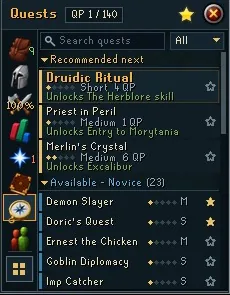
A quest's status tells you what you can do with it.
| Status | What it means |
|---|---|
| Available | You meet the requirements: talk to the start person to begin. |
| In progress | You have started it; its window shows your current step. |
| Not yet available | You are missing a quest, a level or quest points. |
| Complete | You finished it. |
| Auto-completed | It counts as complete without being played (see Auto-completed quests). |
| Completes automatically | It will count as complete once you meet the requirements it names. |
| Replay available | One of the 2.1.12 quests that stayed complete for you: you can play it once for its rewards. |
During a seasonal event the panel also has a Seasonal section for that event's quest, such as the Halloween quest Partying is Such Sweet Sorrow.
The quest window
Click a quest in the panel to open its window. It shows:
- About: what the quest is about, in a few lines.
- Current step: the step you are on, and how many steps there are ("3 of 4").
- Start: who starts it and where.
- Requirements: the quests, levels and quest points it needs.
- Items you need: each item with how many you have and how many you need.
- Enemies: what you fight, with their combat levels.
- Rewards: XP, items, quest points and what it unlocks.
The buttons at the bottom let you pin or unpin the quest, Show next step on map (the World map opens with a marker on the spot), open the Full journal of a quest you have started, and close the window. A quest with no place to show says "This quest has no place to show on the map yet."
For a quest that completes automatically, the window says what is still missing and where to train each missing skill (see where to train).
The quest tracker
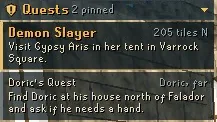
Pinned quests sit at the top left of your screen, one card each, under a header that says how many are pinned. You can fold the header away. Each card shows:
- the quest's name and your next step,
- how far away the place is and in which direction, or that it is far away,
- up to four items the step needs (a tool on your tool belt counts).
The person or object you need glows in the world, and the World map shows an arrow labelled with the quest's name. The quest tracker steps aside during cutscenes and doesn't mark places while you are inside an instance.
Pinning
- Starting a quest pins it when you have a free pin, so the quest tracker follows it from the first step.
- You can pin up to three quests. A fourth says "You can pin up to 3 quests. Unpin one first."
- You can pin quests you can start, quests in progress and seasonal quests, but not finished or locked ones ("You can't pin that quest.").
- Finishing a pinned quest shows Quest complete! on its card for a moment, then the pin is removed.
- Quests without helper steps (Buyers and Cellars, Jungle Potion) show "Open the quest for your next step."
Recommended quests
The panel picks three quests you can start right now and gives each a reason: the first thing it unlocks, its quest points, or its biggest XP reward. It prefers short quests, quests with unlocks, quests that other quests need, and quests that have helper steps. Holiday and seasonal quests are never recommended.
Things to know
- The helper's steps are written for New School 99. They are the same steps as the walkthrough on each quest's page.
- Your pins are saved on your account and come back when you log in. A pinned quest that is finished or can no longer be pinned is dropped at login.
- Characters from before 2.1.12 got their quests in progress pinned automatically the first time the new panel opened, with the chat line "Your quests in progress are pinned at the top left. Open Quests (Q) to change them."
See also
What links here (92)
- A Soul's Bane
- All Fired Up
- Animal Magnetism
- Auto-completed quests
- Big Chompy Bird Hunting
- Biohazard
- Black Knights' Fortress
- Buyers and Cellars
- Clock Tower
- Cook's Assistant
- Creature of Fenkenstrain
- Death Plateau
- Demon Slayer
- Desert Treasure
- Dig Site
- Doric's Quest
- Dragon Slayer
- Druidic Ritual
- Dwarf Cannon
- Eadgar's Ruse
- Eagles' Peak
- Ernest the Chicken
- Family Crest
- Fight Arena
- Fishing Contest
- Gertrude's Cat
- Ghosts Ahoy
- Goblin Diplomacy
- Gunnar's Ground
- Hazeel Cult
- Heroes' Quest
- Holy Grail
- Icthlarin's Little Helper
- Imp Catcher
- In Search of the Myreque
- Jungle Potion
- Legends' Quest
- Let Them Eat Pie
- Lost City
- Main Page
- Merlin's Crystal
- Monk's Friend
- Murder Mystery
- Myths of the White Lands
- Nature Spirit
- Observatory Quest
- One Piercing Note
- Partying is Such Sweet Sorrow
- Patch notes
- Pirate's Treasure
- Plague City
- Priest in Peril
- Prince Ali Rescue
- Quest list
- Quests
- Rag and Bone Man
- Recruitment Drive
- Regicide
- Roving Elves
- Rune Mysteries
- RuneScape version
- Scorpion Catcher
- Sea Slug
- Shades of Mort'ton
- Sheep Herder
- Shield of Arrav
- Shilo Village
- Song from the Depths
- Swept Away
- Tears of Guthix
- Temple of Ikov
- The Blood Pact
- The Elemental Workshop I
- The Feud
- The Fremennik Trials
- The Golem
- The Grand Tree
- The Knight's Sword
- The Lost Tribe
- The Restless Ghost
- The Watchtower
- Tower of Life
- Tree Gnome Village
- Tribal Totem
- Troll Stronghold
- Underground Pass
- Vampyre Slayer
- Waterfall Quest
- What Lies Below
- Where to start
- Witch's House
- Wolf Whistle