
GuidesThe Sanctum
The world
The Sanctum and the Codex menu
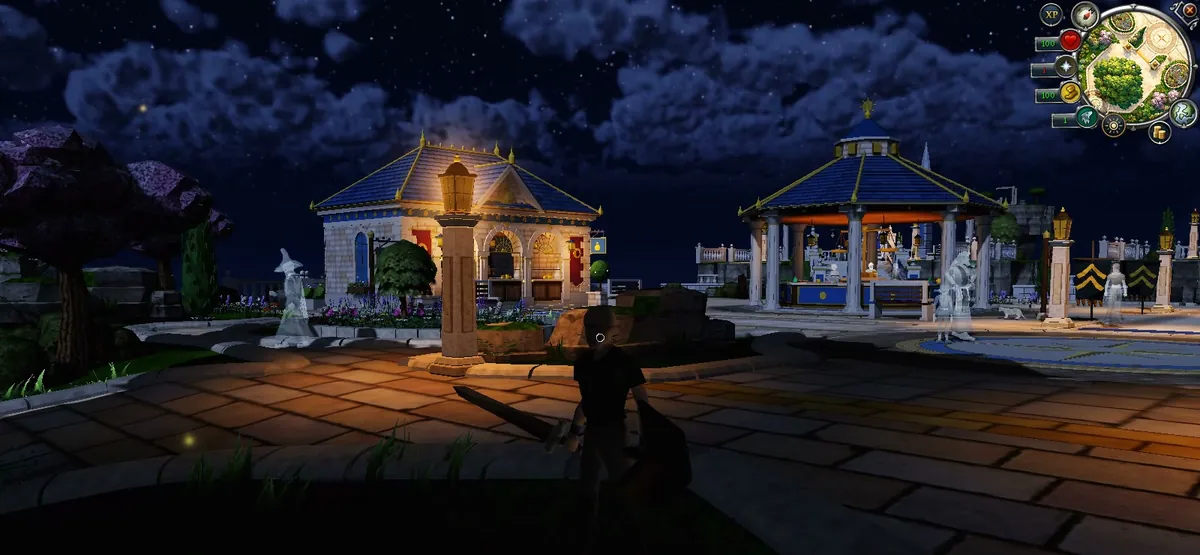
The Sanctum is your home: a calm court of the gods floating above the clouds. New characters arrive here, and you can come back from anywhere in Gielinor.
What's in the Sanctum
- The bank, with gear presets, and the Grand Exchange.
- The Pool of Renewal, which restores you fully.
- The training yard, just west of the Grand Exchange: five dummies (one armoured) to test any weapon, spell, special, combo or god power. A meter shows your damage per second, your best 10 seconds and your max hit. The dummies never die or fight back and give no XP; runes, ammo and power costs are used as normal.
- A place to rest. Outside the yard the Sanctum is a no-combat zone, your stamina refills quickly and sprinting is free.
- Where you wake after a death. You come back on Guthix's dais in the Sanctum, and your items wait for you in a gravestone where you fell.
Getting around
- Return to the Sanctum: the Home button by your minimap takes you back from anywhere.
- Lodestones: new characters start with Lumbridge. Find a lodestone in the world and click it to attune it; the stones near it then show up on your travel map.
- The Gateway to Gielinor: the golden portal in the Sanctum opens the Window into Gielinor. Pick any lodestone you've attuned and step through. Portals only work from the Sanctum, and a stone in the Wilderness asks you first, because other players can attack you there.
- Travel window: press T (or use Home Teleport in your spellbook) to open it from anywhere and see which stones you've found.
- World map: press M.
The gods
The gods of the Sanctum can be heard, tried out and pledged to. Press G for the Pantheon: pledge to a god, earn their Favour as you play, rank up, and unlock their powers on your combat hotbar.
The Codex menu
Instead of the old side panel, every panel lives in one Menu. Press Esc or click Menu at the bottom right.
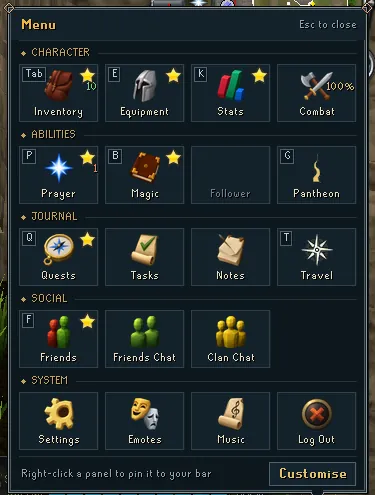
- Character: Inventory, Equipment, Stats, Combat.
- Abilities: Prayer, Magic, the Pantheon.
- Journal: Quests, Tasks, Notes, Travel.
- Social: Friends, Friends Chat, Clan Chat, and Guides, which opens these pages.
- System: Settings, Emotes, Music, Log Out.
- Report a bug sits at the bottom of the Menu, next to Customise (there's also a bug button by your minimap). Your game logs and a screenshot go with the report (you can untick either).
- The most-used panels sit on the bar at the bottom right with their keys (full list). Right-click a panel in the Menu to pin it to your bar, or press Customise.
- With a panel open, C switches between the panel and the camera, so you can keep running with your inventory open.