
You can report a bug or a player without leaving the game. Both go straight to the New School 99 team: a bug report with your game logs and a screenshot, a player report with the reason you pick.
Report a bug
Open the window in any of these ways:
- the bug button next to the minimap
- Menu > Report a bug, at the bottom of the Codex menu next to Customise
- the command
::bugreport - your own shortcut key, if you set one (see below)
Then:
- Pick a category: Crash / graphics, Combat, Quest, Item / bank or Other.
- What went wrong? Tell the team what happened, in your own words: at least 10 characters, up to 1,000.
- What were you doing? Optional, up to 200 characters, for example fighting goblins in Lumbridge or opening my bank.
- Choose what to attach. Both boxes are ticked to start with; untick either one:
- Include my game logs (recommended) sends your game logs and PC and graphics information. Never your password.
- Attach a screenshot of the game sends the picture from the moment you opened the window.
- Send report. You can keep playing while it sends.
When it's sent you get a report ID. Want to add something later? Post in #bug-reports on Discord and quote the ID.
If it can't send
- Offline or the world is busy: the report is kept and sent the next time you log in: "We kept your report and will send it the next time you log in."
- If it can't be kept either, post the problem in #bug-reports on Discord instead.
Your shortcut key
The footer of the window has Shortcut key: (click to change). Click it and press a key: an F key, a letter or a number that the game doesn't already use. Esc sets none. The key is saved on your PC.
The game crashed?
If the game closes or won't start, use the login screen instead: Settings > Send us your logs. See Troubleshooting.
Report a player
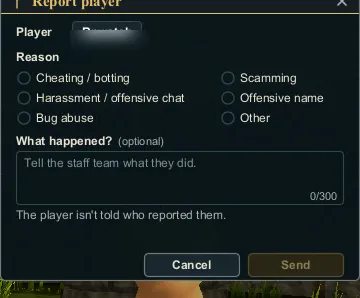
Report a player who cheats, scams, harasses others or breaks the rules in another way. Open the Report player window:
- Right-click the player and pick Report.
- Right-click their name in chat and report them from there.
- The report button on the chat box opens the window with an empty name box: type their name.
Then pick a reason and say what happened (up to 300 characters), and press Send:
| Reason | Use it for |
|---|---|
| Cheating / botting | Using programs or macros to play |
| Scamming | Tricking you out of items or coins |
| Harassment / offensive chat | Abuse, threats, slurs |
| Offensive name | A name that breaks the rules |
| Bug abuse | Using a bug for gain |
| Other | Anything else; explain in the text |
A thank-you line in the chat confirms it was sent, and the window shows a report number. You don't need to report the same player again soon after: the game tells you it already has your report. You can't report yourself.
Things to know
- Be specific. Say where you were and what you saw.
- Bug reports are for the game, not for help. For questions about your account or the game, see Getting help.
- Old game client? Reporting a player needs an up-to-date client: "Update your game to report players."