
Woodcutting and Mining can be played two ways. In Action mode you swing at a tree or rock the way you swing at a monster, hit its glowing weak points and build a combo for more logs, ore and XP. In Classic mode you AFK the way you always did, at the same pace as before.
Left-click a tree or rock for Action, or right-click it and pick Chop down or Mine for Classic. Your levels, tools, trees and rocks are the same in both.
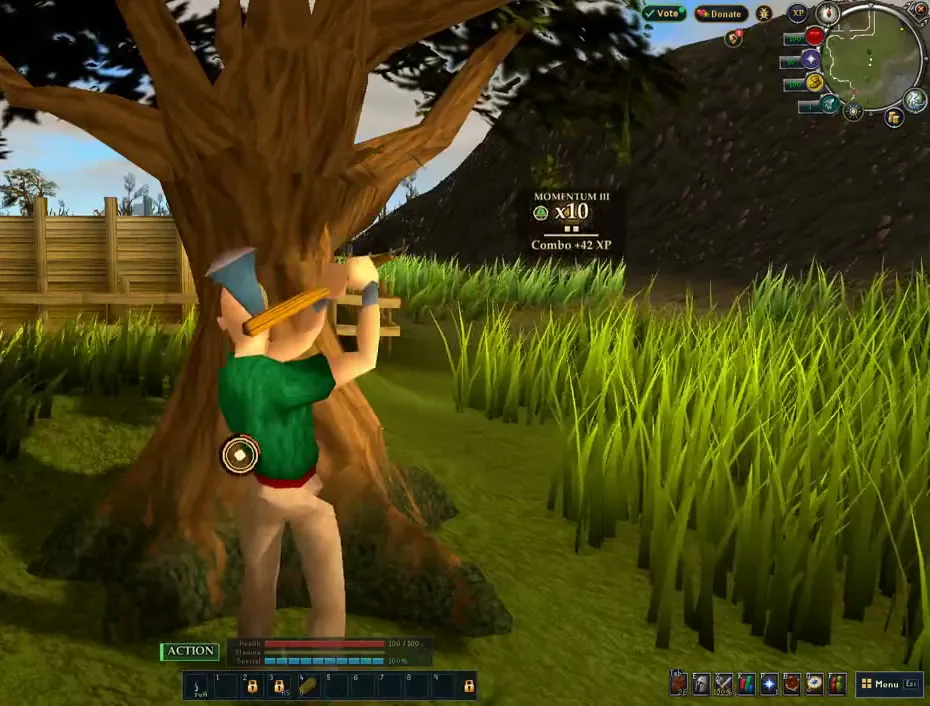
Action or Classic
Action
- Left-click a tree or rock. Your character starts swinging right away, like in combat, and a glowing circle appears on the tree or rock: that's the weak point. Click it to strike.
- More logs and ore per hour than AFK (up to about 1.4x the logs and 1.45x the ore), plus bonus XP.
- Only in Action: combos, straight logs, pristine ore and fallen trunks to chop.
- Auto: stop clicking and after about 3 seconds you carry on by yourself at the normal AFK pace. The pill says ACTION auto. Hit a circle any time to jump back in.
Classic
- Right-click > Chop down or Mine. The AFK loop you know, at the same pace as before.
- It sticks. Right-clicking switches you to Classic, so clicking the tree or rock again just keeps you going.
Your choice is saved to your account. Every time you switch, a short tip says what a click does now.
Controls
These are the defaults. Every key can be changed in Game Settings > Panel keys (see Keybinds).
| Do this | What happens |
|---|---|
| Left-click a tree or rock | Start swinging in Action mode |
| Left-click the glowing circle | Strike the weak point |
| Right-click > Chop down / Mine | Classic mode (AFK) |
| N | Switch between Action and Classic. Change the key in Game Settings > Panel keys > Skill mode. |
| The ACTION / CLASSIC pill | Shows next to your health bars while you skill. Click it to switch. |
| Game Settings > Skilling | Left-click on trees and rocks: pick Action or Classic for good. |
 /  | Swing at the circle under your crosshair (the middle of the screen unless you moved it). Turn the camera with the right stick to line it up. |
 /  | The action wheel has a Skill mode slice to switch between Action and Classic. |
More keys and the full controller layout are on Controls and Controller support.
Weak points
Click the glowing circle. It bursts with a pop, you strike, and the next circle appears somewhere else on the same tree or rock, always on the side facing you.
- Beat the ring. The first circle of a chain waits for you. After that each circle has a ring that runs down: the first ring gives you 2.4 seconds, and every hit makes the next ring 8% shorter, down to 0.8 seconds from the 15th ring on.
- Hit early for a PERFECT. Click in the first half of the ring and the hit counts as PERFECT: the best odds of a straight log or pristine ore.
- Miss and the chain ends. If the ring runs out, or you hit the tree or rock away from the circle, the chain stops. The next circle waits for you with no ring, and the chain starts slow again.
How long each ring gives you:
| Ring | Time to hit it | PERFECT if you hit within |
|---|---|---|
| 1st | 2.4 s | 1.2 s |
| 5th | 1.7 s | 0.86 s |
| 10th | 1.1 s | 0.57 s |
| 15th and after | 0.8 s | 0.4 s |
- Circles never slide while you aim. If the next one is out of view, an arrow at the edge of the screen points to it. The camera never moves for you.
- Every rock has circles, from copper to runite.
- Hitting circles is what counts, not clicking fast. Clicking around them breaks your chain.
- Other players see every swing and the burst where you hit. Only you see your circles.
Combos and Momentum
Every circle you hit in a row adds one to your combo. Keep it going and your swings speed up:
| Momentum | Hits in a row |
|---|---|
| Momentum I | 3 |
| Momentum II | 6 |
| Momentum III | 10 |
The combo box shows your tier, the chain count and the XP the chain has earned (Combo +N XP).
- Keep it going: fell a tree or mine a rock dry and start on the next one within 8 seconds. Your combo and your ring speed carry over.
- Full bag? The chain pauses instead of ending. Free a slot (drop, bank or use a log or ore) and swing again within 8 seconds to keep your combo.
- A miss ends the chain and your combo starts again from zero.
- Heavy hatchets (adamant, rune, dragon and the inferno adze) speed up to Momentum II and no further in Woodcutting. See Hatchets and pickaxes.
A good chain gets you up to about 1.4x the logs and 1.45x the ore per hour of AFK, plus bonus XP. Accuracy is what keeps a chain alive, so aim for the circle, not for speed.
Things to know
- My combo reset. Why? You missed (the ring ran out, or you hit away from the circle), more than 8 seconds passed before you started on the next tree or rock, or your bag was full and you didn't free a slot and swing again within 8 seconds.
- Can I still AFK? Yes. Classic works exactly like before, at the same pace. In Action mode you can also stop clicking: after about 3 seconds you carry on at the AFK pace by yourself.
- Does clicking faster help? No. Hitting the circles is what counts.
- Can other players see my circles? No, only you see them.
- Better tools and higher levels help. Each hatchet or pickaxe above iron adds 1% to 5% to your chance of a straight log or pristine ore, and every level above the tree's or rock's own adds another 0.25%, up to 8%. See Hatchets and pickaxes.
- Which trees and rocks? Normal, achey, oak, willow, teak, maple, mahogany, arctic pine, eucalyptus, yew and magic trees, and every rock from copper to runite. Other trees, such as ivy, are cut the 2012 way. See the tree list and the ore list.
- Fishing and the other gathering skills play as they did in 2012. Action and Classic are for Woodcutting and Mining only.
See also
- Woodcutting, including trees that fall
- Mining, including rich veins
- Straight logs and Pristine ore
- Hatchets and pickaxes
- Game Settings and Keybinds
What links here (40)
- Agility
- Ashwood Awakening
- Attack
- Blast Furnace
- Constitution
- Construction
- Controller support
- Controls
- Cooking
- Crafting
- Defence
- Dungeoneering
- Farming
- Firemaking
- Fishing
- Fletching
- Game screen
- Game Settings
- Glossary
- Hatchets and pickaxes
- Herblore
- Hunter
- Keybinds
- Magic
- Main Page
- Mining
- Patch notes
- Prayer
- Pristine ore
- Ranged
- Runecrafting
- Skills
- Slayer
- Smithing
- Straight logs
- Strength
- Summoning
- Thieving
- Where to start
- Woodcutting