
Supporter ranks thank players who donate to keep New School 99 running. Donations only help pay for the servers. Each rank brings a coin badge next to your name in chat, a title after your name, a mount to ride and an aura that follows you.
Open the Donate window with the gold Donate button by the minimap, the Donate button at the top of the Menu, or the command ::donate. The window shows every rank, your total and how much is left to the next rank, with a slider to pick an amount.
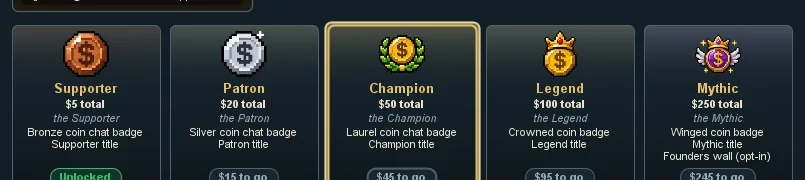
The ranks
Your rank follows the total you have donated, in US dollars.
| Rank | Total | Chat badge | Title |
|---|---|---|---|
 Supporter | $5 | Bronze coin | the Supporter |
 Patron | $20 | Silver coin | the Patron |
 Champion | $50 | Laurel coin | the Champion |
 Legend | $100 | Crowned coin | the Legend |
 Mythic | $250 | Winged coin | the Mythic |
- The badge shows next to your name in chat, server chat included.
- The title shows after your name, each rank in its own colour: bronze, silver, gold, pale gold and purple. When you reach your first rank and have no other title, it is put on for you. You can pick any rank's title up to your own, or none, in the Donate window.
- Ironmen keep the Ironman title: "Ironmen keep the Ironman title."
Mounts
Each rank from Patron up can ride a mount, and a higher rank unlocks every lower mount too.
| Mount | Rank | Notes |
|---|---|---|
| Brown pack mule | Patron | Trots on the ground |
| Terrorbird | Champion | Squawks and runs |
| Armoured unicorn | Legend | Snorts and whinnies |
| Baby black dragon | Mythic | Flies with Space over rocks, bushes and cacti |
- Riding: press H, use the hotbar slot, or open the new mount slot in the equipment screen (Ride, Unequip, Choose mount). In the Donate window, the Mounts tab shows a riding preview of each one;
::mountworks too. - Mounted sprint is exactly 5% faster than sprinting on foot, on the ground and in flight; walking and running are unchanged.
- Flight (dragon): it flies over rocks, bushes and cacti, but never over fences, walls or water, and never indoors.
- Where you can ride: anywhere you can walk outdoors and on the ground indoors. Not in minigames, instanced bosses, Dungeoneering, Castle Wars, Pest Control, Soul Wars, your house, quests and cutscenes, jail or PvP areas. The Ride button tells you why when it refuses.
- Getting off: you dismount on an attack click, a hit, a teleport or an animation, and you cannot mount again for 10 s after combat. Drinking from a waterskin no longer knocks you off.
- Everyone sees riders, their gaits and the mounted sprint, on HD and the legacy renderer.
Auras
Every rank wears its own aura, seen by every player:
| Rank | Aura |
|---|---|
| Supporter | Glimmer: twinkling copper stars |
| Patron | Orbit: silver and ice-blue motes circling the body |
| Champion | Rising Embers: gold embers, rim light and a ground glow |
| Legend | Rune Circlet: a ring of gold glyphs turning at the waist |
| Mythic | a purple energy flame with small lightning sparks |
- On by default. A power-up flare plays whenever your rank rises, and the aura follows your later rank-ups.
- Settings: Game Settings > Other players' auras (Show, Reduced, Hide) and My donator aura (On, Off). The Donate window also has an aura switch and Wear this aura with an HD preview on the dais.
- Where it changes: no auras in Battle Royale, and toned down in PvP areas. Far away, in crowds and on the legacy renderer they use lighter forms.
Your rank on right-click
Right-clicking a player shows their donator rank after their name and level in the rank's colour, for example Attack Name (level-126) [Mythic]. Players who hide their badge do not show it.
The Founders wall
Mythic supporters can choose to have their name on the Founders wall, a plaque in The Sanctum. Right-click the plaque and pick Read to see it. It's opt-in: nobody is listed without saying yes.
Things to know
- Want to support the game for free? Vote on the toplists: every vote helps new players find New School 99 and pays you Vote Points.